Stamp Sizes: Dimensions in mm and Inches, with Print Examples
A useful stamp size fits both your wording and the space where the mark will go. Measure that space, choose a short layout, then check a paper proof at its intended size. A design that looks clear when enlarged on screen can be difficult to read on an envelope or invoice.
This guide compares illustrative stamp dimensions in millimetres and inches, shows a worked 40 mm example, and includes a printable size sheet. These are design starting points, not a universal manufacturing standard. Ask your supplier which sizes and artwork specifications it supports.
Stamp sizes in mm and inches
For a round stamp, measure the diameter across the circle. For a rectangle, record width × height; swapping those numbers changes the layout. These figures refer to the intended artwork footprint, not the size of a stamp handle or housing.
| Layout | Dimensions (mm) | Inches, rounded | Try it for |
|---|---|---|---|
| Small round | 30 diameter | 1.18 diameter | Initials or one short label |
| Medium round | 40 diameter | 1.57 diameter | A short business name and centre text |
| Large round | 50 diameter | 1.97 diameter | A larger logo or more breathing room |
| Short rectangle | 38 × 14 | 1.50 × 0.55 | A brief status label or initials |
| Address rectangle | 55 × 25 | 2.17 × 0.98 | A name and a short multi-line address |
| Wide rectangle | 70 × 30 | 2.76 × 1.18 | A wider text layout or logo beside text |
Convert millimetres to inches by dividing by 25.4. NIST defines one inch as exactly 25.4 mm. The two-decimal figures in the table are rounded for comparison; send the original millimetre dimensions to your supplier.
Compare 30, 40 and 50 mm designs
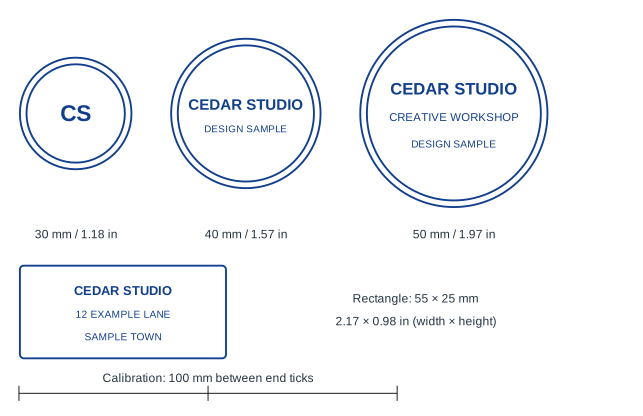
- 30 mm: the initials design keeps the centre simple. Adding a full address would change the space needed.
- 40 mm: the fictional Cedar Studio design uses two short lines. Test your actual name rather than assuming it will fit like the example.
- 50 mm: the larger design leaves room around three lines. It also covers more of a document, so check the available blank space.
For your own comparison, start with the company stamp template or the address stamp template. Replace the sample wording before deciding on the finished size.
How to choose a size for your wording
Check the design’s proportions as well as its width. Stampzio’s current rectangular canvas is 3:2, so a 55 mm-wide export is about 36.7 mm high. It is not a 55 × 25 mm design. Do not stretch it to force a fit: arrange the artwork at the required proportions in an appropriate layout tool, or agree a compatible size with your supplier.
- Measure the destination. Mark the available width and height on a copy of the document or packaging. Leave room around nearby text.
- Prioritize the information. Start with the name and one useful secondary line. Remove unnecessary words before reducing all the lettering.
- Choose the shape. A rectangle can accommodate stacked address lines; a circle can suit a short name with a simple centre. Neither shape guarantees that a long name will remain readable.
- Check the smallest detail. Look at punctuation, gaps between letters, logo strokes and the space inside the border at the intended print size.
- Confirm production limits. Minimum text size, line thickness, margins and ink behaviour depend on the supplier and process. Get its requirements before ordering.
For regulated seals, confirm the required wording, shape and dimensions with the relevant authority. These examples do not define a compliant notary, medical or professional seal.
Print a size test at 100%
Open the printable stamp size sheet
- Open the sheet and choose Print. Use A4 or US Letter paper, portrait orientation, and 100% scale. Disable page headers and footers. Avoid a setting that fits or shrinks the artwork to the page.
- Measure the calibration line on the printed page. It should be 100 mm long from the left tick to the right tick. If it is not, correct the print scaling and try again.
- Place the examples over your intended document or packaging area. Compare the room each shape occupies.
- Repeat the check with your own exported design, set to its intended width in a document or layout application.
If you save a PDF and print it in Acrobat, its Actual size setting prints without scaling. A paper proof tests layout and legibility; it does not reproduce a rubber stamp’s ink spread or prove manufacturing suitability.
A worked example: a 40 mm stamp
Pixel dimensions and physical dimensions are different. For an illustrative target of 300 pixels per inch (PPI), calculate:
40 ÷ 25.4 × 300 = 472.44 pixels. Round up to at least 473 pixels across when you need to meet that target. A 600 PPI target would need 945 pixels across. These are example targets; use your supplier’s specification.
For the current circular Stampzio canvas, Standard (1×) exports a 300 × 300 pixel PNG, High (3×) exports 900 × 900, and Print (10×) exports 3000 × 3000. High has enough pixels for the 40 mm / 300 PPI example, provided the original artwork is clear. Increasing export resolution cannot recover detail missing from a small uploaded logo.
The editor’s millimetre readout is a design reference. The current export uses pixel dimensions and does not encode your selected millimetre width as a guaranteed print size. In the receiving application, set the example image to 40 mm (4 cm) wide, keep its aspect ratio locked, and inspect the final output.
SVG keeps vector text and lines scalable, but an embedded bitmap logo still has finite resolution, and text can depend on available fonts. Ask the supplier whether it needs outlined text, a particular file format or separate size instructions. Read the PNG, SVG and DPI guide for format choices.
Before sending the artwork
Compare short and long return-address layouts or two-name wedding examples when the longest line determines your required width.
- Specify the diameter, or width × height, in millimetres.
- Check spelling and the smallest text on a correctly scaled paper proof.
- Send the original export rather than a screenshot.
- Ask the supplier to check line detail, fonts and production requirements.
- Approve its final proof before production.
Continue with preparing a stamp design for a print shop, or open the stamp maker to try your layout.
Calculate dimensions, check PNG transparency and download a true-scale test PDF